> For the complete documentation index, see [llms.txt](https://docs.chiliz.com/llms.txt). Markdown versions of documentation pages are available by appending `.md` to page URLs; this page is available as [Markdown](https://docs.chiliz.com/develop/advanced/get-telegram-notifications-for-fan-token-transfers.md).
# Get Telegram notifications for Fan Token transfers
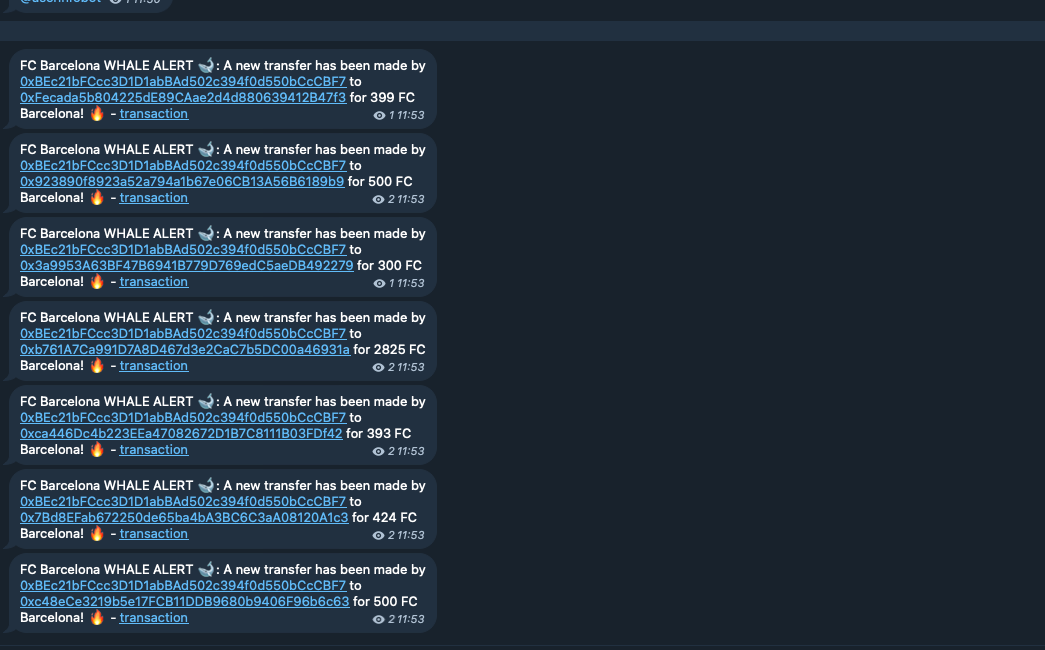
Set up a Telegram whale-watcher bot for Fan Token transfers using Envio's indexer, capturing transfer events on Chiliz Chain and triggering alerts on threshold breaches.
Monitoring the Fan Token™ transfers that happen on Chiliz Chain is a great way to stay informed about high-value moves and keep your community in the loop.
With a bit of configuration and code, you can set up a Telegram bot to notify a group whenever a Fan Token™ transfer surpasses a certain threshold.
## How to do it using Envio?
[Envio](https://envio.dev/) is a powerful indexing tool that allows developers to listen for smart contract events on Chiliz and perform an action based on the event.
In this how-to, you’ll see how to configure the bot, capture the relevant events, and automatically trigger Telegram alerts, thus turning your setup into a “whale watcher” for major transfers.
### Step 1: Install Prerequisites
Before we begin, ensure you have the [required tools](https://docs.envio.dev/docs/HyperIndex/getting-started#prerequisites) installed:
* [pnpm](https://pnpm.io/)
* [Node.js](https://nodejs.org/en)
* [Docker](https://www.docker.com/)
{% hint style="info" %}
The full project can be found [on this GitHub repository](https://github.com/DenhamPreen/fc-barce-fan-token-indexer/tree/main).
{% endhint %}
### Step 2: Initialize Envio Indexer
Run the following command to initialize an Envio indexer and follow the prompts to generate an ERC20 template on Chiliz Chain (which is an EVM-compatible blockchain):
```bash
pnpx envio init
```
Here are the various selections you should make when prompted:
### Step 3: Configure `config.yaml`
Modify the `config.yaml` file to specify the contract address of the FC Barcelona Fan Token™ (or any other Fan Token™ you want to track):
{% code overflow="wrap" lineNumbers="true" %}
```yaml
# yaml-language-server: $schema=./node_modules/envio/evm.schema.json
name: fan-token-watcher
description: A simple indexer for Fan Tokens that posts notifications to Telegram on large transfers
networks:
- id: 8888 # Chiliz
start_block: 0
contracts:
- name: ERC20
address: "0xFD3C73b3B09D418841dd6Aff341b2d6e3abA433b" # FC Barcelona
handler: src/EventHandlers.ts
events:
- event: "Transfer(address indexed from, address indexed to, uint256 value)"
field_selection:
transaction_fields:
- "hash"
```
{% endcode %}
**Note:** We remove the `approval` event as we are only interested in transfers.
### Step 4: Simplify the GraphQL Schema
Modify the `schema.graphql` file to track only account balances:
```graphql
type Account {
id: ID! # Address of the account
balance: BigInt! # Account balance of tokens
}
```
At this point, we have an ERC20 indexer that listens for events.
Now, let’s add logic to post Telegram notifications.
### Step 5: Implement Telegram Notification Logic
Modify the `/src/EventHandlers.ts` file to include logic for detecting large transfers and sending Telegram alerts.
{% code overflow="wrap" lineNumbers="true" %}
```typescript
import { ERC20 } from "generated";
import { isIndexingAtHead, indexBalances } from "./libs/helpers";
import { fetchEnsHandle } from "./libs/ens";
import { sendMessageToTelegram } from "./libs/telegram";
import { WHALE_THRESHOLD, explorerUrlAddress, explorerUrlTx } from "./constants";
ERC20.Transfer.handler(async ({ event, context }) => {
if (isIndexingAtHead(event.block.timestamp) && event.params.value >= BigInt(WHALE_THRESHOLD)) {
const ensHandleOrFromAddress = await fetchEnsHandle(event.params.from);
const ensHandleOrToAddress = await fetchEnsHandle(event.params.to);
const msg = `FC Barcelona WHALE ALERT 🐋: A new transfer has been made by ${ensHandleOrFromAddress} to ${ensHandleOrToAddress} for ${event.params.value} FC Barcelona! 🔥 - transaction`;
await sendMessageToTelegram(msg);
}
await indexBalances(context, event);
});
```
{% endcode %}
{% hint style="success" %}
The sample `/libs/` folder can be found [right here on GitHub](https://github.com/DenhamPreen/fc-barce-fan-token-indexer/tree/main/src/libs), including the `helpers.ts` and `ens.ts` files.
{% endhint %}
### Step 6: Configure Constants
Create a `constants.ts` file to store environment variables:
{% code overflow="wrap" lineNumbers="true" %}
```typescript
export const EXPLORER_URL_MONAD = process.env.ENVIO_EXPLORER_URL_MONAD;
export const WHALE_THRESHOLD: string = process.env.ENVIO_WHALE_THRESHOLD ?? "1000";
export const BOT_TOKEN = process.env.ENVIO_BOT_TOKEN;
export const CHANNEL_ID = process.env.ENVIO_TELEGRAM_CHANNEL_ID;
export const MESSAGE_THREAD_ID = process.env.ENVIO_TELEGRAM_MESSAGE_THREAD_ID;
export const explorerUrlAddress = (address: string) =>
EXPLORER_URL_MONAD + "address/" + address;
export const explorerUrlTx = (txHash: string) =>
EXPLORER_URL_MONAD + "tx/" + txHash;
```
{% endcode %}
### Step 7: Sending Telegram Messages
Install the [Axios HTTP client](https://axios-http.com/):
```bash
pnpm i axios
```
Create a helper function in `libs/telegram.ts` to send messages using Axios:
{% code overflow="wrap" lineNumbers="true" %}
```typescript
import axios from "axios";
import { CHANNEL_ID, MESSAGE_THREAD_ID, BOT_TOKEN } from "../constants";
export const sendMessageToTelegram = async (message: string): Promise => {
try {
const apiUrl = `https://api.telegram.org/bot${BOT_TOKEN}/sendMessage`;
await axios.post(apiUrl, {
chat_id: CHANNEL_ID,
text: message,
parse_mode: "HTML",
});
} catch (error) {
console.error("Error sending message:", error);
}
};
```
{% endcode %}
### Step 8: Final Configuration and Running the Indexer
#### Configure `.env` File
```sh
cp .env.example .env
```
Edit `.env` with your Telegram bot credentials:
```sh
ENVIO_BOT_TOKEN=
ENVIO_TELEGRAM_CHANNEL_ID=
ENVIO_TELEGRAM_MESSAGE_THREAD_ID=
ENVIO_EXPLORER_URL="https://chiliscan.com/"
ENVIO_WHALE_THRESHOLD=1000
```
#### Create a Telegram Bot
1. Message `@BotFather` on Telegram and run:
```
/newbot
```
2. Follow the prompts to get your bot token.
3. Add the bot to your Telegram group and run `/start`.
4. Visit `https://api.telegram.org/bot/getUpdates` to find the group chat ID.
{% hint style="success" %}
If you created the new group with the bot and you only get `{"ok":true,"result":[]}`, remove and add the bot again to the group.
{% endhint %}
#### Finally, install dependencies and start the indexer
```sh
pnpm i
pnpm envio dev
```
With this setup, you now have an Envio-powered indexer that listens for Fan Token transfers and posts whale alerts to Telegram.
To go further, you can self-host the indexer or deploy it to Envio’s hosted service.
And since we are saving the balances, it can be used as a GraphQL balance API too.
---
# Agent Instructions
This documentation is published with GitBook. GitBook is the documentation platform designed so that both humans and AI agents can read, navigate, and reason over technical content effectively. Learn more at gitbook.com.
## Querying This Documentation
If you need additional information that is not directly available in this page, you can query the documentation by asking a question.
Perform an HTTP GET request on the following URL with the `ask` and `goal` query parameters:
```
GET https://docs.chiliz.com/develop/advanced/get-telegram-notifications-for-fan-token-transfers.md?ask=&goal=
```
`ask` is the immediate question: it should be specific, self-contained, and written in natural language.
`goal` is what the user is ultimately trying to achieve, the reason they need the answer. Sharing it helps GitBook give you a better, more relevant answer. A goal is most helpful when it describes the outcome the user wants rather than restating the question. For example, with `ask=how do I create an API token`, a goal like `automate deployments from our CI pipeline` lets GitBook tailor the answer to that use case.
The response will contain a direct answer to the question and relevant excerpts and sources from the documentation.
Use this mechanism when the answer is not explicitly present in the current page, you need clarification or additional context, or you want to retrieve related documentation sections.