> For the complete documentation index, see [llms.txt](https://docs.chiliz.com/llms.txt). Markdown versions of documentation pages are available by appending `.md` to page URLs; this page is available as [Markdown](https://docs.chiliz.com/pl/tworzenie/podstawy/weryfikacja-smart-kontraktu/splaszczenie-smart-kontraktu.md).
# Spłaszczenie smart kontraktu
Spłaszcz smart kontrakt Solidity i wszystkie jego zależności do pojedynczego pliku .sol używając Remix lub Hardhat, aby uprościć weryfikację kodu źródłowego w explorerach Chiliz Chain.
Spłaszczanie smart kontraktu to proces łączenia głównego kontraktu ze wszystkimi jego zależnościami (interfejsami, bibliotekami, dziedziczonymi kontraktami) w jeden, samodzielny plik `.sol`. To znacznie ułatwia weryfikację wdrożonego kontraktu.
{% hint style="info" %}
Nie musisz spłaszczać kontraktu, aby go wdrożyć.
Spłaszczenie to przede wszystkim krok po wdrożeniu, używany do weryfikacji kodu źródłowego w explorerze.
{% endhint %}
Ponieważ Chiliz Chain to blockchain kompatybilny z EVM, dostępnych jest kilka narzędzi do spłaszczania kontraktów.
{% hint style="info" %}
Jeśli wdrażasz z oryginalnych plików, a następnie spłaszczasz je, aby zweryfikować cały kontrakt, musisz upewnić się, że ustawienia kompilacji się nie zmieniły.
W przeciwnym razie możesz otrzymać błąd typu "Bytecode mismatch" i weryfikacja się nie powiedzie.
{% endhint %}
## Spłaszczanie za pomocą Remix IDE
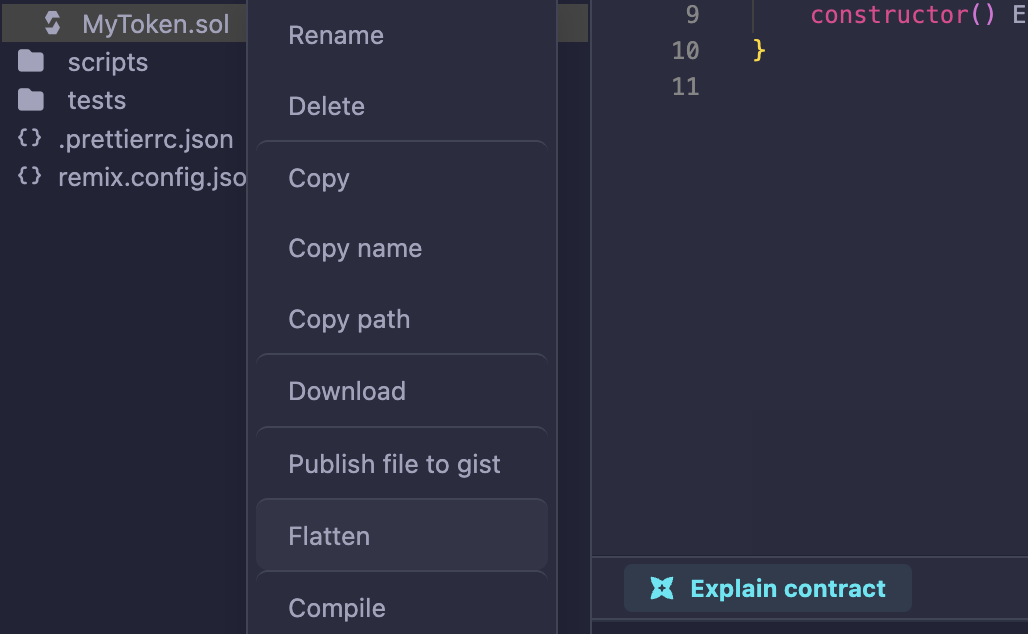
W Eksploratorze Plików kliknij prawym przyciskiem myszy swój główny kontrakt i wybierz "Flatten" z menu.
Remix wygeneruje kontrakt `CONTRACT_flattened.sol` w Twoim folderze.
## Spłaszczanie za pomocą Hardhat
Dostosuj następujące polecenie do swojego projektu:
```bash
npx hardhat flatten contracts/MyContract.sol > Flattened.sol
```
{% hint style="warning" %}
Ponieważ spłaszczony kontrakt może mieć tysiące linii, jest koszmarny do rzeczywistego tworzenia i utrzymania.
Generuj go tylko wtedy, gdy jest potrzebny: np. przy weryfikacji wdrożonego kontraktu.
{% endhint %}
---
# Agent Instructions
This documentation is published with GitBook. GitBook is the documentation platform designed so that both humans and AI agents can read, navigate, and reason over technical content effectively. Learn more at gitbook.com.
## Querying This Documentation
If you need additional information that is not directly available in this page, you can query the documentation by asking a question.
Perform an HTTP GET request on the following URL with the `ask` and `goal` query parameters:
```
GET https://docs.chiliz.com/pl/tworzenie/podstawy/weryfikacja-smart-kontraktu/splaszczenie-smart-kontraktu.md?ask=&goal=
```
`ask` is the immediate question: it should be specific, self-contained, and written in natural language.
`goal` is what the user is ultimately trying to achieve, the reason they need the answer. Sharing it helps GitBook give you a better, more relevant answer. A goal is most helpful when it describes the outcome the user wants rather than restating the question. For example, with `ask=how do I create an API token`, a goal like `automate deployments from our CI pipeline` lets GitBook tailor the answer to that use case.
The response will contain a direct answer to the question and relevant excerpts and sources from the documentation.
Use this mechanism when the answer is not explicitly present in the current page, you need clarification or additional context, or you want to retrieve related documentation sections.