> For the complete documentation index, see [llms.txt](https://docs.chiliz.com/llms.txt). Markdown versions of documentation pages are available by appending `.md` to page URLs; this page is available as [Markdown](https://docs.chiliz.com/tr/gelistir/temel-ogeler/akilli-sozlesme-dogrulama/akilli-sozlesme-duzlestirme.md).
# Akıllı Sözleşme Düzleştirme
Chiliz Chain gezginlerinde kaynak kodu doğrulamasını kolaylaştırmak için Remix veya Hardhat kullanarak bir Solidity akıllı sözleşmesini ve tüm bağımlılıklarını tek bir .sol dosyasında birleştirin.
Akıllı sözleşme düzleştirmek, ana sözleşmeyi tüm bağımlılıklarıyla (arayüzler, kütüphaneler, miras alınan sözleşmeler) birleştirerek tek ve bağımsız bir `.sol` dosyası oluşturma işlemidir. Bu, deploy edilmiş sözleşmenin doğrulanmasını çok daha kolay hale getirir.
{% hint style="info" %}
Sözleşmenizi deploy etmek için düzleştirmeniz gerekmez.
Düzleştirme, öncelikle gezginde kaynak kodunuzu doğrulamak için kullanılan deploy sonrası bir adımdır.
{% endhint %}
Chiliz Chain EVM uyumlu bir blockchain olduğundan, sözleşme düzleştirmek için çeşitli araçlar mevcuttur.
{% hint style="info" %}
Orijinal dosyalarınızdan deploy ettikten sonra tüm sözleşmeyi doğrulamak için düzleştirirseniz, derleme ayarlarında hiçbir şeyin değişmediğinden emin olmalısınız.
Aksi takdirde "Bytecode uyuşmazlığı" gibi bir hata alma riskiyle karşılaşabilir ve doğrulama başarısız olabilir.
{% endhint %}
## Remix IDE ile Düzleştirme
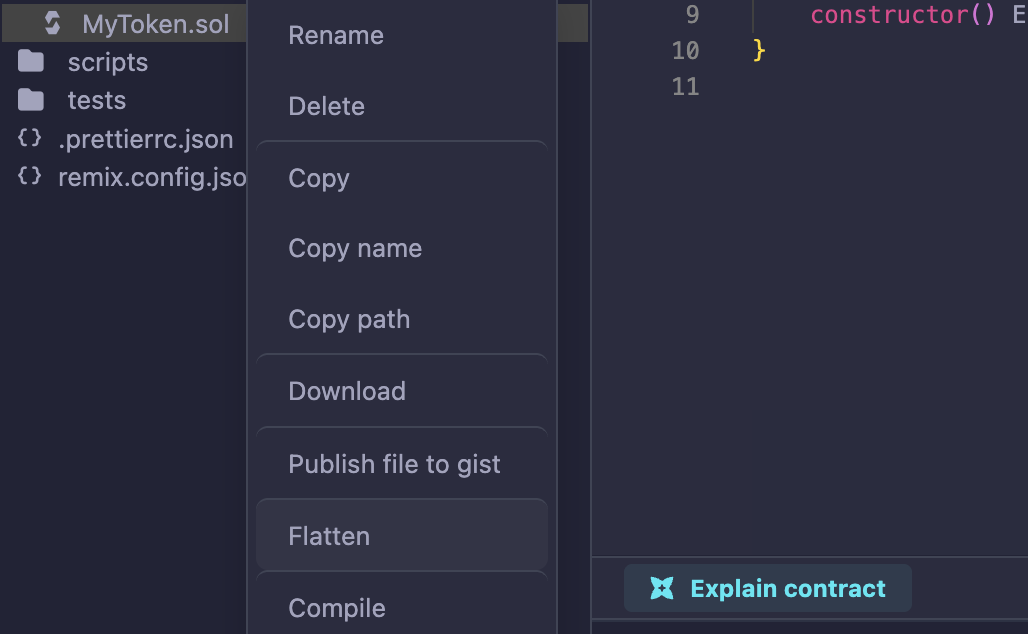
Dosya Gezgininde ana sözleşmenize sağ tıklayın ve menüden "Düzleştir"i seçin.
Remix, klasörünüzde bir `CONTRACT_flattened.sol` sözleşmesi oluşturacaktır.
## Hardhat ile Düzleştirme
Aşağıdaki satırı iş akışınıza göre uyarlayın:
```bash
npx hardhat flatten contracts/MyContract.sol > Flattened.sol
```
{% hint style="warning" %}
Düzleştirilmiş bir sözleşme binlerce satır uzunluğunda olabileceğinden, fiili geliştirme ve bakım açısından son derece elverişsizdir.
Yalnızca ihtiyaç duyulduğunda, örneğin deploy edilen sözleşmeyi doğrularken oluşturulmalıdır.
{% endhint %}
---
# Agent Instructions
This documentation is published with GitBook. GitBook is the documentation platform designed so that both humans and AI agents can read, navigate, and reason over technical content effectively. Learn more at gitbook.com.
## Querying This Documentation
If you need additional information that is not directly available in this page, you can query the documentation by asking a question.
Perform an HTTP GET request on the following URL with the `ask` and `goal` query parameters:
```
GET https://docs.chiliz.com/tr/gelistir/temel-ogeler/akilli-sozlesme-dogrulama/akilli-sozlesme-duzlestirme.md?ask=&goal=
```
`ask` is the immediate question: it should be specific, self-contained, and written in natural language.
`goal` is what the user is ultimately trying to achieve, the reason they need the answer. Sharing it helps GitBook give you a better, more relevant answer. A goal is most helpful when it describes the outcome the user wants rather than restating the question. For example, with `ask=how do I create an API token`, a goal like `automate deployments from our CI pipeline` lets GitBook tailor the answer to that use case.
The response will contain a direct answer to the question and relevant excerpts and sources from the documentation.
Use this mechanism when the answer is not explicitly present in the current page, you need clarification or additional context, or you want to retrieve related documentation sections.