> For the complete documentation index, see [llms.txt](https://docs.chiliz.com/llms.txt). Markdown versions of documentation pages are available by appending `.md` to page URLs; this page is available as [Markdown](https://docs.chiliz.com/quick-start/starter-kits/create-nfts-for-your-sports-team.md).
# Create NFTs for Your Sports Team
Step-by-step starter kit to launch a sports team NFT collection on Chiliz Chain: file preparation, IPFS hosting, ERC-721/ERC-1155 selection, thirdweb deployment, and OKX listing.
Here are the various steps to take you from nothing to selling a collection of NFTs branded to your team, such as player cards.
{% hint style="info" %}
For a more generic approach to NFTs, you can dive into the [Work with NFTs](/develop/advanced/work-with-nfts.md) section, which is heavily referenced in this page.
{% endhint %}
For each step, this starter kit points you to the relevant documentation page on this site, along with a short explanation. Get ready!
## Preparing the files
Whatever your target, an NFT project always requires two types of files:
* The visual assets themselves, which are the images or videos that you want to turn into NFTs.
* The metadata files, which describe the visual assets in a way that can be handled by blockchain tools (most notably, where they are hosted).
Learn more here:
{% content-ref url="/pages/8a6dGcAkUeJ78Zd5WHWo" %}
[Preparing the NFT files](/develop/advanced/work-with-nfts/preparing-the-nft-files.md)
{% endcontent-ref %}
When creating a "Seasonal Player" NFT series for your sports team, the graphic ratio could be one of these:
* Classic trading card: 630 x 880 pixels (2.5" x 3.5" ratio). This gives the nostalgic feel of physical sports cards.
* Modern digital: 1080 x 1080 pixels (Square) or 1080 x 1920 (Vertical Phone/Story format).
If you are creating an NFT series for team players, you should have a folder on your computer that looks like this:
```
/2024_2025_Season_Assets
/Images
player_01.png
player_02.png
...
player_11.png
```
With your files created, you must host them properly:
{% content-ref url="/pages/zkeWU5tiTSyRLD8MSwGQ" %}
[Hosting your NFT on IPFS](/develop/advanced/work-with-nfts/hosting-your-nft-on-ipfs.md)
{% endcontent-ref %}
Once your files are hosted on an IPFS host, you can generate the attached JSON files, resulting in this folder organization:
```
/2024_2025_Season_Assets
/Images
player_01.png
player_02.png
...
player_11.png
/Metadata
player_01.json <-- Points to player_01.png on IPFS
player_02.json <-- Points to player_02.png on IPFS
...
player_11.json <-- Points to player_11.png on IPFS
```
{% hint style="info" %}
You don't have to create the metadata files by hand!\
Most NFT-centric tools will handle batch IPFS upload and metadata file generation for you.
{% endhint %}
## Setting up your Web3 environment
Before creating the NFTs, you need to configure certain technical details on your side.
### Install a Web3 wallet
The most well-known wallet is MetaMask.
{% content-ref url="/pages/sX0yak7ql3J63wsGoMHc" %}
[Install MetaMask](/learn/about-wallets/how-to-use-metamask/install-metamask.md)
{% endcontent-ref %}
{% content-ref url="/pages/7jmbvsuzJaARscErNwWb" %}
[How to use MetaMask](/learn/about-wallets/how-to-use-metamask.md)
{% endcontent-ref %}
### Configure the wallet for Chiliz Chain
Set it up to work on both networks:
* Spicy Testnet for testing your collection.
* Chiliz Mainnet once everything is tested and ready to launch.
{% content-ref url="/pages/tzJomHxArA5lwaA7IFvl" %}
[Link Chiliz Chain and MetaMask](/learn/about-wallets/how-to-use-metamask/link-chiliz-chain-and-metamask.md)
{% endcontent-ref %}
{% content-ref url="/pages/oYKKHjOmAZJp2Vfye0kX" %}
[Connect using RPC](/develop/basics/connect-to-chiliz-chain/connect-using-rpc.md)
{% endcontent-ref %}
### Obtain CHZ tokens
You will need some $CHZ in your wallet to pay for "gas" or transaction fees (deployment and minting).
#### For testing: Get free tokens
{% content-ref url="/pages/Af9548Yd4RQMNgtsUkq9" %}
[Obtain Free Testnet Tokens](/develop/basics/obtain-free-testnet-tokens.md)
{% endcontent-ref %}
#### For production: Buy CHZ tokens
You can buy CHZ tokens on most crypto exchanges: [Coinbase](https://www.coinbase.com/), [Meria](https://www.meria.com/), [Kraken](https://www.kraken.com/), [Bitpanda](https://www.bitpanda.com/), etc.
## Choosing your NFT standard
There are several NFT standard you can choose from, depending on your project's needs.
{% content-ref url="/pages/6jKxG34DH2ynN0hV3uMS" %}
[Choosing the right NFT contract](/develop/advanced/work-with-nfts/choosing-the-right-nft-contract.md)
{% endcontent-ref %}
For a "Seasonal Player" series, you need to decide how the NFTs will work:
* [ERC-1155](https://wizard.openzeppelin.com/#erc1155) (Edition / Multi-Token):\
Recommended for Player Cards.\
This allows you to create multiple copies of the same item (for instance, 100 copies of "Player A - 2024 Season").
* [ERC-721](https://wizard.openzeppelin.com/#erc721) (Collection):\
Best if every single NFT is unique (e.g., "Player A - Signed 1/1").
## Creating and Hosting the NFTs
There are several ways to create (or "mint") your collection of NFTs.
### **The Dashboard Way (easiest)**
This is the easiest way for a sports team to deploy without writing complex code.
1. Go to [thirdweb](https://thirdweb.com/), create an account by connecting with your Web3 wallet. You will be directed to a dashboard.
2. Make sure that your wallet is set on Chiliz Chain Mainnet (or Spicy Testnet if you are testing).
3. Click on the "Create Project" button, give your project a name (for instance, "2025-2026 Team NFT"), and only all the "thirdweb.com" domain for now. Click "Create".
4. thirdweb then displays a Client ID and Secret Key, to be saved on your computer. These allow your app, if any, to authenticate to the project. Confirm that you saved them, and click "View Project".
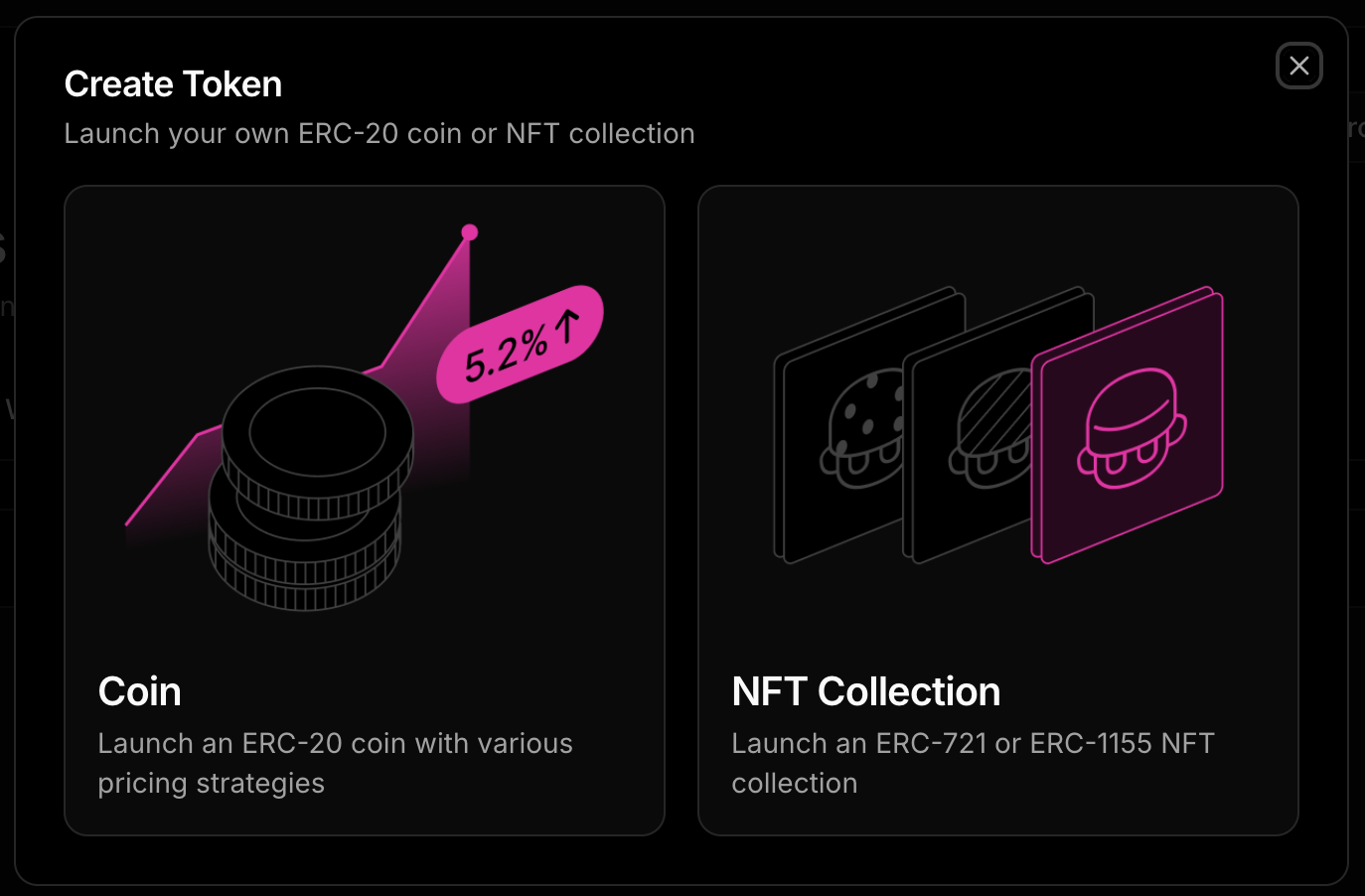
5. From the project dashboard, click on the "Tokens" option on the left menu, then click on the "Create Token" button and select "NFT Collection".
6. From there, you can follow the guide from thirdweb:
{% embed url="" %}
### **The Marketplace Way**
If you want to mint and immediately list for sale:
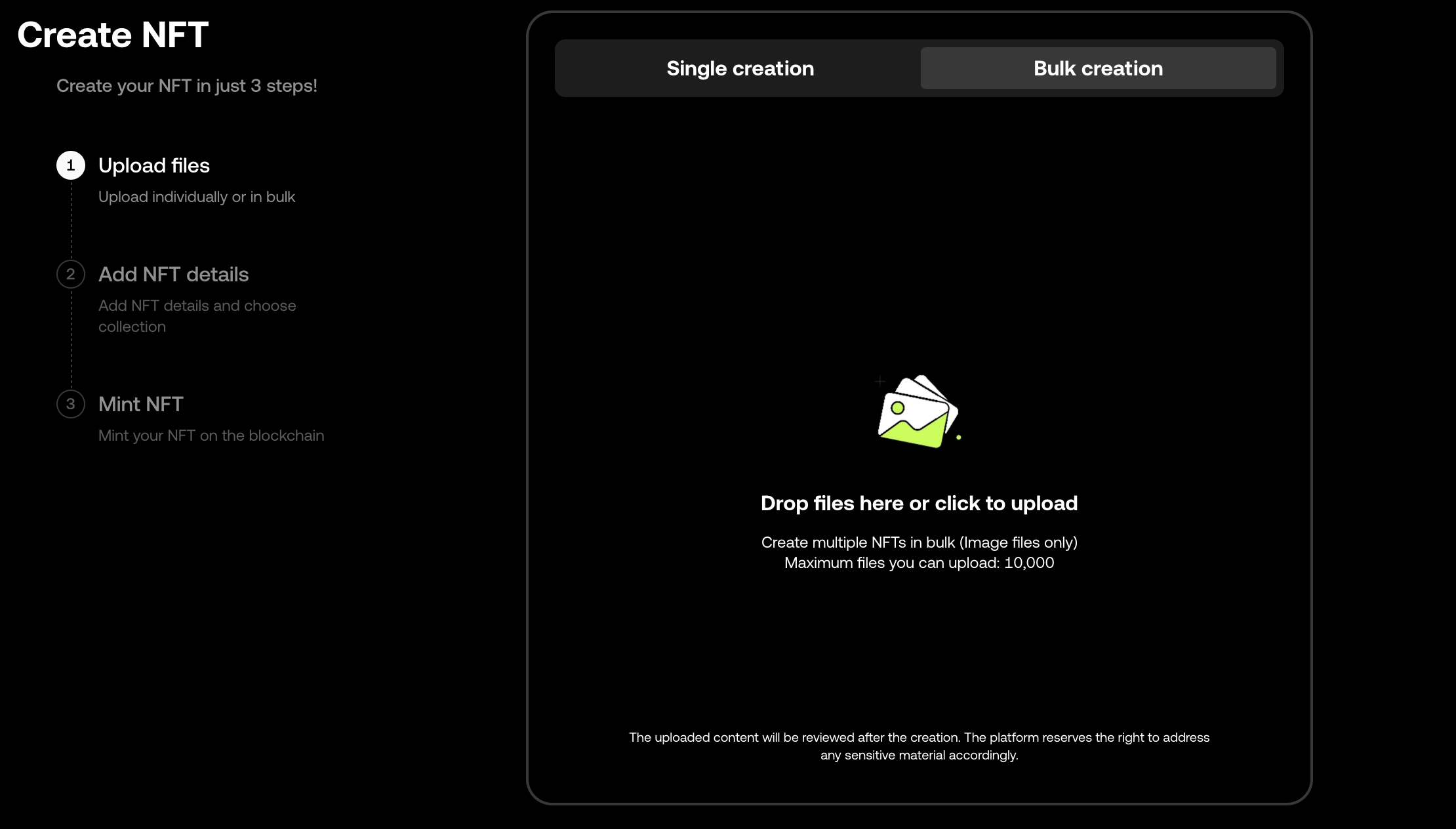
1. Go to [OKX](https://web3.okx.com/), create an account by connecting with your Web3 wallet, then open the [OKX NFT Studio](https://web3.okx.com/nft/create/home), which is part of the [OKX NFT Marketplace](https://web3.okx.com/nft).
2. Click "Create now", select "Bulk creation", then follow the instructions.
### **The Developer Way (Custom Contract)**
If you have developers, they can use Hardhat, Viem, Remix IDE, or other EVM-compatible tools.
Follow our guides in the [Work with NFTs](/develop/advanced/work-with-nfts.md) section for information on hosting, minting, and listing NFTs.
---
# Agent Instructions
This documentation is published with GitBook. GitBook is the documentation platform designed so that both humans and AI agents can read, navigate, and reason over technical content effectively. Learn more at gitbook.com.
## Querying This Documentation
If you need additional information that is not directly available in this page, you can query the documentation by asking a question.
Perform an HTTP GET request on the following URL with the `ask` and `goal` query parameters:
```
GET https://docs.chiliz.com/quick-start/starter-kits/create-nfts-for-your-sports-team.md?ask=&goal=
```
`ask` is the immediate question: it should be specific, self-contained, and written in natural language.
`goal` is what the user is ultimately trying to achieve, the reason they need the answer. Sharing it helps GitBook give you a better, more relevant answer. A goal is most helpful when it describes the outcome the user wants rather than restating the question. For example, with `ask=how do I create an API token`, a goal like `automate deployments from our CI pipeline` lets GitBook tailor the answer to that use case.
The response will contain a direct answer to the question and relevant excerpts and sources from the documentation.
Use this mechanism when the answer is not explicitly present in the current page, you need clarification or additional context, or you want to retrieve related documentation sections.